Your coding agents can finally share a notebook
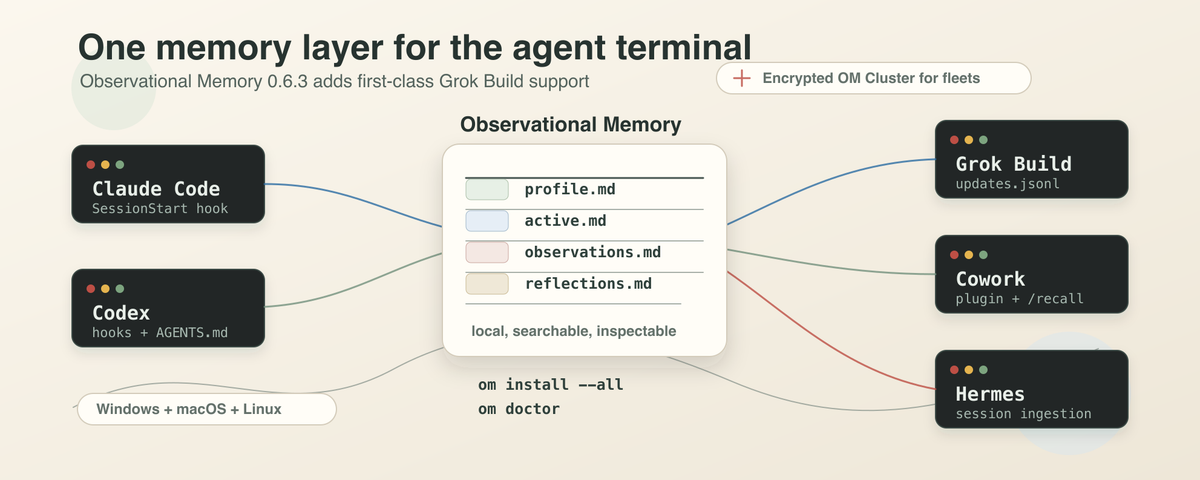
Observational Memory 0.6.3 puts Claude Code, Codex, Grok Build, Cowork, and Hermes on the same local memory layer. One set of plain markdown files on your machine. Every supported agent starts a little less cold.
Update (September 2026): Observational Memory has been retired and is no longer maintained. This article remains as a historical engineering note; installation and support instructions are no longer current. Final releases: core 0.10.1, Hermes plugin 1.5.2, Grok Build plugin 0.1.3.
Here is the situation I keep finding myself in. I open Claude Code before breakfast to plan a refactor. I switch to Codex around lunch to actually do it. And now, as of this week, I can fire up Grok Build in the late afternoon to help me untangle a CI failure. None of them know what the others learned that day.
That is the part of agent tooling no one wants to talk about. Each tool has gotten good at remembering you inside its own product. None of them are good at remembering you between products.
xAI shipped Grok Build on May 14, 2026 as an early beta for SuperGrok Heavy subscribers. It runs from the terminal. It reads AGENTS.md. It supports hooks, plugins, skills, and MCP servers. It can split larger tasks across parallel subagents. In other words, it slots into the same shape as Claude Code and Codex.
That is good news for anyone who lives in a terminal. It also makes the memory problem harder to ignore.
If you only use one coding agent, you can let that agent own your context. The moment you use two, you start re-explaining yourself. Three agents and you are pasting the same caveats into three different chat boxes. Five agents and the situation is silly.
This is the question I want to put in front of you, because it is the one I think matters:
Can the next agent inherit what the last one learned?
Observational Memory 0.6.3 is my attempt at a yes. With this release, Claude Code, Codex, Grok Build, Claude Cowork, and Hermes can all read from and write to one local memory layer on your machine. As far as I know, OM is the first open-source, agent-agnostic memory provider that does this for those five surfaces at once.
What "shared memory" actually means here
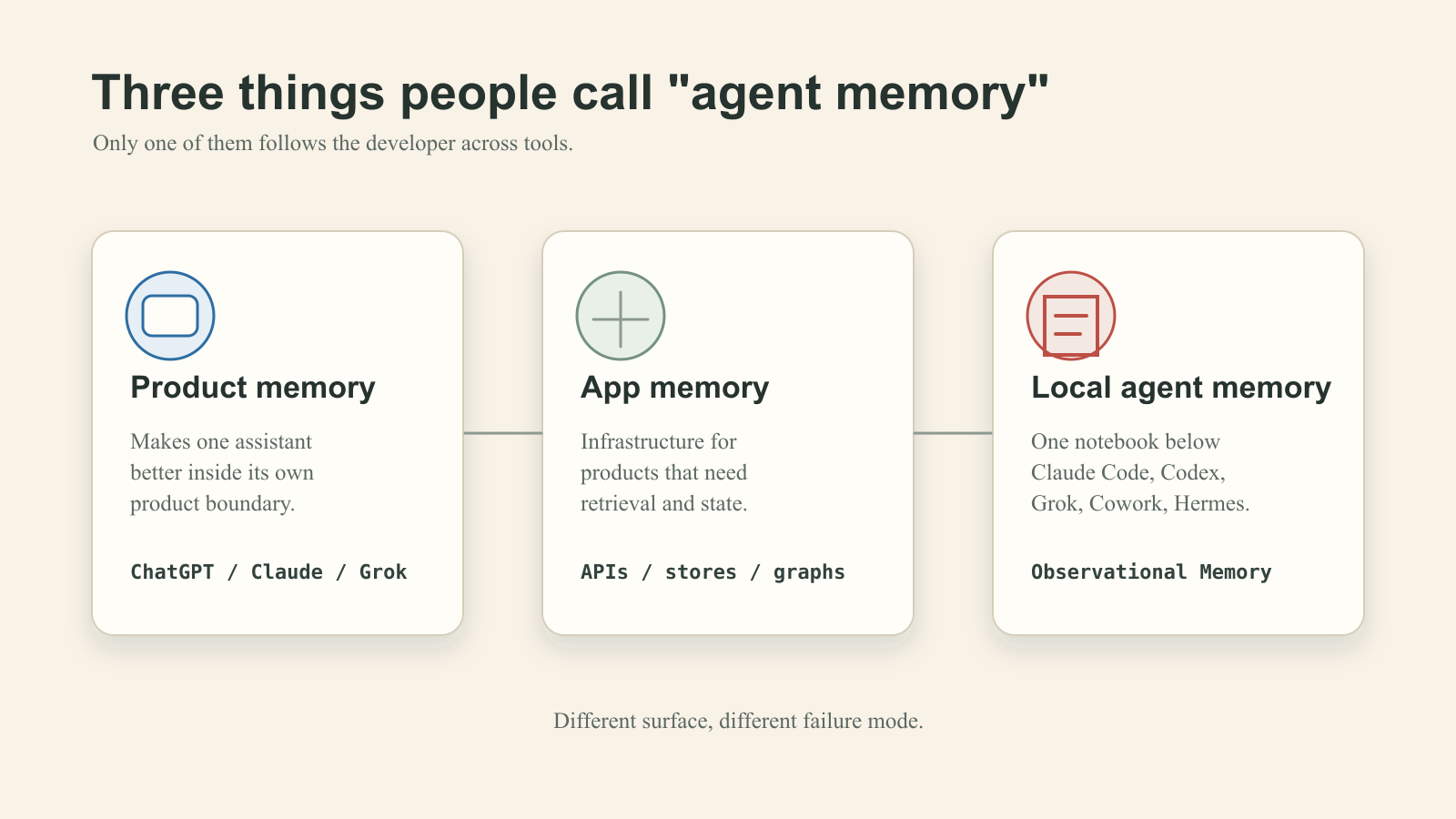
I want to be careful, because the phrase "agent memory" is doing a lot of work in marketing copy right now. Three different things get called memory, and they are not the same thing.
- Product memory. The assistant remembers you inside its own app. ChatGPT remembers your name. Claude remembers your projects. Grok has its own native memory directory. Useful, but tied to one product.
- Application memory infrastructure. Building blocks like vector stores, file stores, and memory APIs that you use to build memory into your own software. Useful for developers shipping products.
- Local agent memory. A small set of files on your laptop that any agent you run can read at the start of a session and add to at the end. Useful when you are the one switching between agents all day.
OM lives in the third category. It is not a replacement for Grok's native memory. It is not trying to be ChatGPT Memory. It is the shared notebook that sits underneath whichever tool you happen to have open.
The new release in one paragraph
OM 0.6.3 adds first-class Grok Build support through four new commands:
om install --grok
om install --all
om observe --source grok
om grok-checkpoint --transcript ~/.grok/sessions/.../updates.jsonl
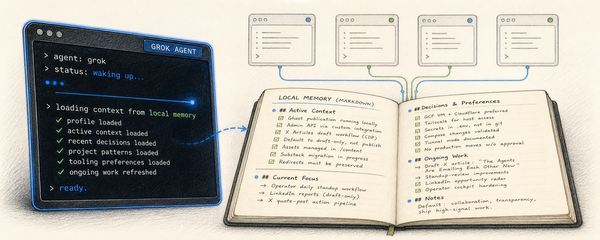
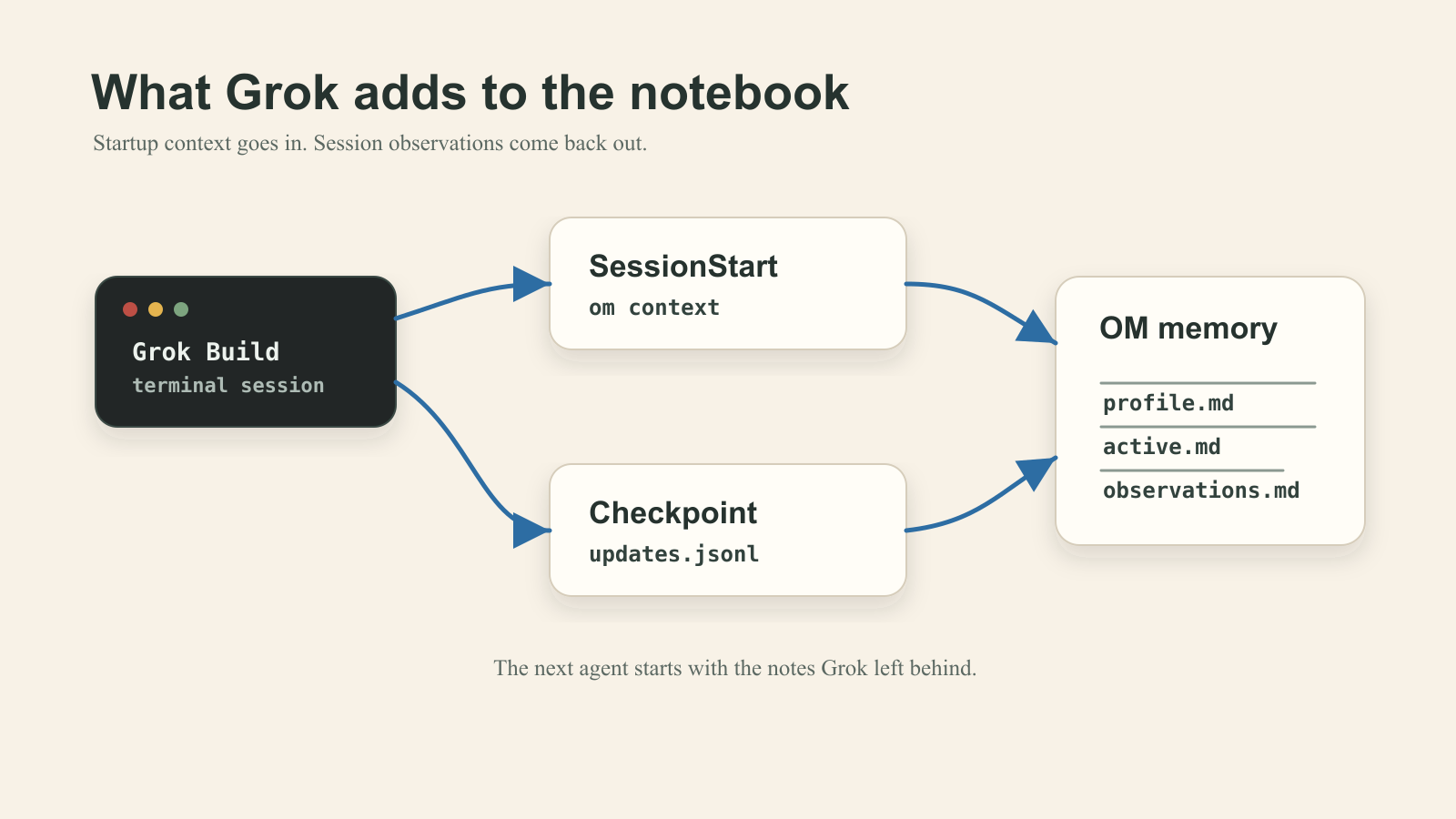
om install --grok writes an OM-owned hook file at ~/.grok/hooks/observational-memory.json. The startup hook calls om context, which gives Grok the same compact briefing every other agent gets: your stable profile, what you are actively working on, the relevant repo, and the guardrails that need to survive the session. The checkpoint hooks queue Grok's updates.jsonl transcript for observation. Then om observe --source grok turns recent sessions into notes the next agent can read.
Plain words for what that buys you: if Grok notices something while editing your repo today, Codex sees it tomorrow. If Claude Code agreed on a release boundary yesterday, Grok sees it before it makes its first edit today.
The compatibility check that protects your context window
Grok Build also reads Claude-style configuration for compatibility, which is a thoughtful design choice on xAI's part. It is also a foot-gun for memory systems. If OM blindly installed a Grok startup hook on a machine that already had a Claude Code hook, Grok would get the same context injected twice.
So 0.6.3 checks. If Grok is already inheriting OM startup context through the Claude compatibility layer, OM does not install a second SessionStart injection. The headline is "Grok has memory." The actual product work is "Grok has memory once, from the source that already owns the contract, without doubling the payload that reaches the model."
I am pointing at this because it is the kind of detail that decides whether a memory tool still feels invisible after weeks of daily use.
You can open the memory
Here is the part that I think is most worth taking seriously, and the part that took me the longest to commit to as a design choice.
Your memory lives in plain markdown files on your own disk:
~/.local/share/observational-memory/observations.md
~/.local/share/observational-memory/reflections.md
~/.local/share/observational-memory/profile.md
~/.local/share/observational-memory/active.md
You can cat them. You can grep them. You can open them in your favorite editor and delete the line you do not want the next agent to see. You can back them up. You can email them to yourself. You can delete the whole directory.
There are sharper tools for the same job:
om recall --query "what did we decide about publishing?"
om search "green dry-run is not authorization"
om doctor
I keep choosing plain files because black-box memory can stay confidently wrong for a long time. When an agent says "I remember you decided X," and you have no way to check, you eventually catch it being wrong about something important. By the time you notice, the rest of the conversation has been built on top of the wrong premise.
Markdown memory can be wrong too. The difference is you catch the error while it is still a one-line fix in a text editor, instead of a cascading misunderstanding across three future agent sessions.
The agents have uneven hooks, and that is fine
I want to be honest about how complete this is, because the answer is "complete enough to be useful, not uniform."
- Claude Code, Codex, and Grok Build have installer-managed hooks. OM writes them when you run
om install, and they fire automatically. - Cowork has a local macOS plugin with startup context, checkpoint hooks, a
/recallcommand, and a skill. - Hermes support is transcript ingestion today. A first-class Hermes plugin is planned separately.
Each agent product gives you a different surface to plug into, and OM uses whichever one is available. The shape OM is aiming for is the same in every case:
agent session -> observations -> reflections -> profile + active context
                                     |
                                     +-> om recall / om search
Every agent enters through whatever door it supports. Every agent leaves notes the next one can read.
Memory that travels
Two earlier changes in the OM line make this release more than a single-laptop story.
OM now runs on Windows alongside macOS and Linux. The Windows build uses %LOCALAPPDATA% for memory and %APPDATA% for config, runs background jobs through Task Scheduler, and stops assuming you have bash and jq on your path for Claude and Grok hooks.
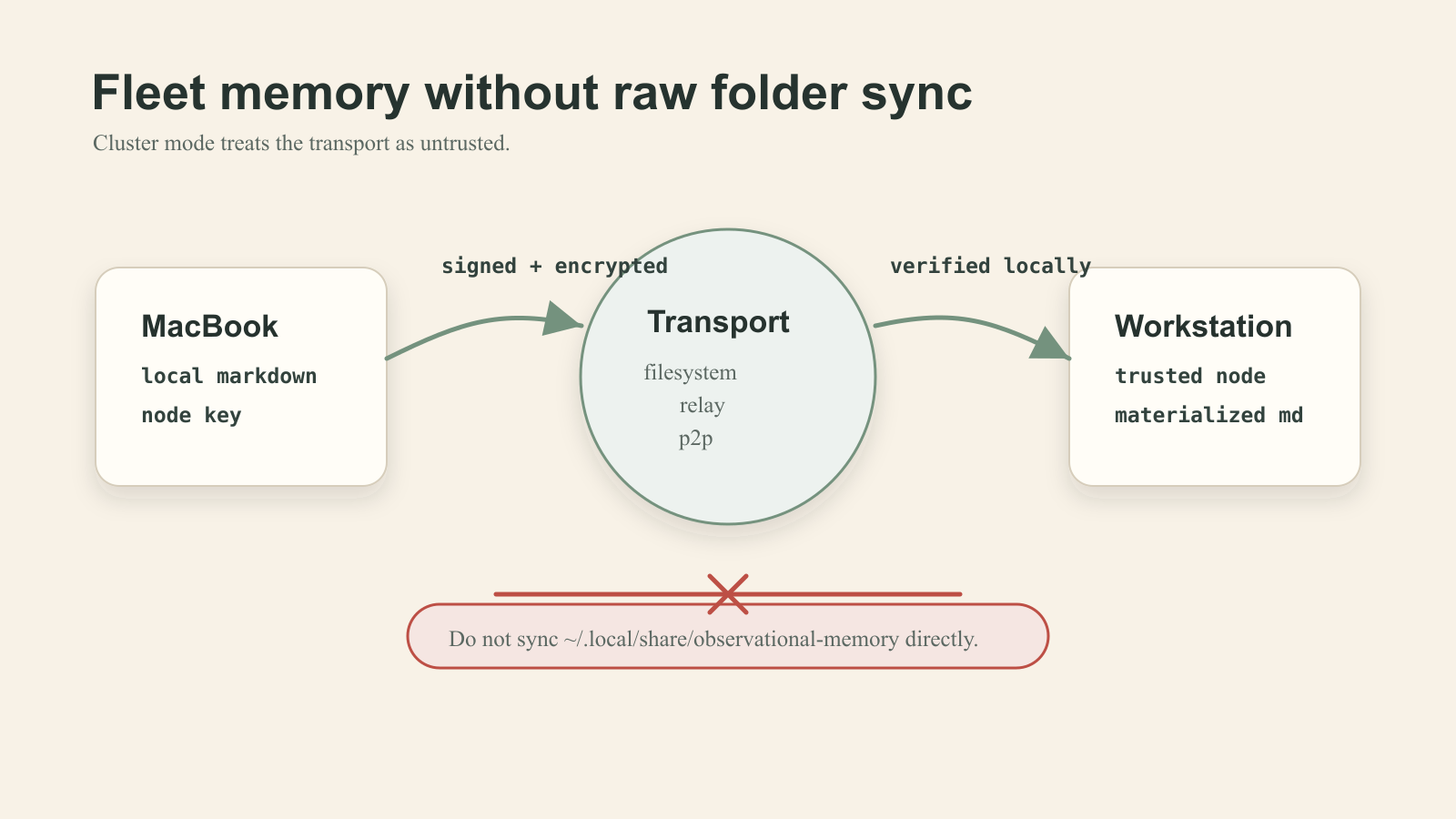
OM Cluster lets you share memory across multiple machines without syncing the raw markdown directory. Cluster mode is opt-in. The transport is treated as untrusted. Records are encrypted and signed before they leave your machine. New machines join through explicit invite and approval.
If you take only one operational rule from this article, take this one:
Do not sync ~/.local/share/observational-memory/ directly through Dropbox, iCloud, Syncthing, rsync, or a NAS. Use om cluster.
The reason is the difference between "my memory files happen to be in two places" and "my agents can share memory across a fleet, with a trust model, in a way I can audit."
Why this release, why now
Grok Build's launch is a useful forcing function for a conversation that was already coming.
The agent terminal is plural now. Claude Code is not the only door. Codex is not the only door. Grok Build is here, with plan mode, subagents, hooks, skills, and MCP compatibility. Cowork and Hermes point at adjacent surfaces: enterprise desktop agents and remote operational agents. Each of them is a place for context to fragment.
I do not want five private memories that each know a different version of the repo. I want one local memory layer underneath the tools, with five properties that matter when you are trying to ship something non-trivial:
- local enough to inspect when a claim feels off
- portable enough that switching tools does not erase yesterday's work
- explicit enough that approval boundaries stay visible in the files
- small enough to install in five minutes
- secure enough to move between machines without hoping a generic sync service gets the trust model right
That is what observational-memory is trying to be.
You would not be the first person on it. PyPI Stats is showing the OM library at around 1,100 downloads per month, and the trend line is up. That is not a stadium full of users yet, but it is enough people running it on real machines that the rough edges get found and fixed quickly.
If you want to try it:
uv tool install observational-memory
om install --all
om doctor
Or with Homebrew on macOS:
brew install intertwine/tap/observational-memory
om install --all
om doctor
The repo is at github.com/intertwine/observational-memory. If it saves you the first re-explanation tomorrow, a star on the repo helps more people find it.